Additional information

PID

979898

Manufacturer address

Äyritie 12 B, 01510 Vantaa, Finland

Manufacturer's email address

https://www.brother.fi/

Manufacturer name

Brother Nordic A/S, Suomen sivuliike

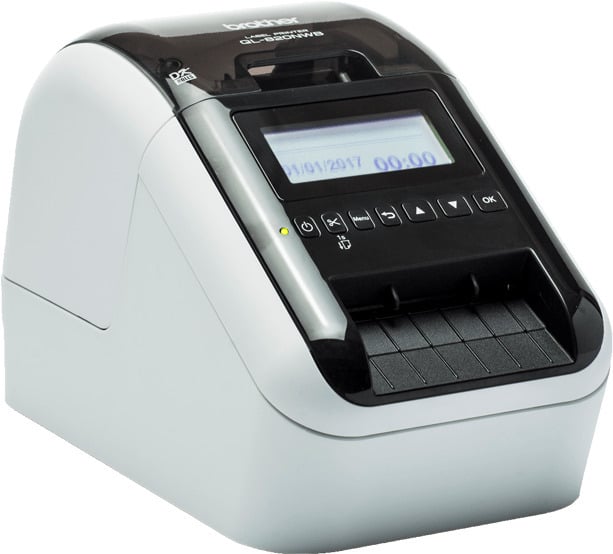
USB, wired network connection, Wi-Fi and Bluetooth connectivity, as well as MFI and AirPrint support. The large backlit LCD screen makes setup and configuration easy.

  • Design and print name badges for events and your company’s guests from your computer (PC/Mac) using Brother’s P-touch Editor
  • You can also use compatible visitor management applications and programs from other manufacturers
  • USB, Ethernet, WiFi, and Bluetooth connectivity
  • Available name badge rolls both adhesive and non-adhesive
  • Optional rechargeable lithium-ion battery for mobile use

Managing visitors and events becomes easier when you print name badges for your customers that make them easy to identify. Visitor badges print easily as you can print them from your PC/Mac computer, smartphone, or tablet. The QL-820NWBcVM offers versatile connections including USB, Ethernet, WiFi, and Bluetooth. You can download a free app or program for printing visitor badges.

You can also use compatible visitor management applications and programs from other manufacturers.

Third-party software vendors can easily add support for this label printer to their own applications and solutions using Brother’s SDK development kits.

Print in black and red

Choose Brother’s DK22205 label roll for your QL-820NWBcVM printer to print your labels in red and black. You can easily highlight important information such as the nearest exit route or validity period by printing that information in red.

Name badge label directly on clothing

Brother’s DK11234 name badge label can be attached directly to clothing. You no longer need a separate clip-on badge holder. This significantly speeds up the check-in process for incoming guests at various events. Guests can easily remove and dispose of the name badge label after the event.

Versatile uses

In addition to visitor badges, you can create labels for document archiving, signage, envelopes, packages, shelves, and many other purposes.

Multiple connectivity options

  • USB for local printing from PC or Mac computers
  • Wired network connection (Ethernet) allows remote printing from PC or Mac computers
  • Wi-Fi and Bluetooth® provide fast connectivity for mobile use, so you can print from your tablet or smartphone in addition to your computer
  • AirPrint and MFi ensure easy integration with Apple devices

Free software and app for designing and printing name badges

Brother P-touch Editor label design software for PC and Mac computers and Brother iPrint & Label app for iOS and Android devices are available as free downloads. Design exactly the visitor badge, access pass, or event pass you want.

Technical specifications:

  • Memory capacity 6 MB
  • Memory slots 255
  • DK roll labels (die-cut and continuous roll labels)
  • AirPrint, Bluetooth, MFi, USB interface, Wi-Fi Direct, Wired network connection 10/100 BASE-TX, Wireless network connection IEEE 802.11 b/g/n
  • Device dimensions 125 mm (W) x 234 mm (D) x 145 mm (H), weight 1.16 kg
  • Maximum label width 62 mm
  • Maximum print width 58 mm
  • Resolution (dpi) 300 x 300, 300 x 600
  • Standard print speed 110 labels/min

package includes

  • Printer
  • Standard address label29 mm x 90 mm (100 rolls/piece)
  • Roll labelfor two-color printing (62 mm x 5 m)
  • USB cable
  • Power supply andpower cord
  • User manual

Toote pildid on illustratiivsed ja näitlikud. Originaaltoote omadused võivad nende tegelikust väljanägemisest erineda, seega palun tutvuge tootekirjelduses toodud tootespetsifikatsioonidega.
LAOS OLEMAS

Brother QL-820NWBC Label Printer for Visitor Badges

265.35
sis. KM 24%
  • Print in black and red
  • Name tag sticker directly on clothing
  • 110 stickers / min
  • Versatile applications
  • Maximum sticker width 62 mm
Eeldatav tarneaeg: 4-7 päeva
Maksa hiljem või osana
Tootekood: QL820NWBCZW1
EAN kood: 4977766826969, 2220009798984

USB, wired network connection, Wi-Fi and Bluetooth connectivity, as well as MFI and AirPrint support. The large backlit LCD screen makes setup and configuration easy.

  • Design and print name badges for events and your company’s guests from your computer (PC/Mac) using Brother’s P-touch Editor
  • You can also use compatible visitor management applications and programs from other manufacturers
  • USB, Ethernet, WiFi, and Bluetooth connectivity
  • Available name badge rolls both adhesive and non-adhesive
  • Optional rechargeable lithium-ion battery for mobile use

Managing visitors and events becomes easier when you print name badges for your customers that make them easy to identify. Visitor badges print easily as you can print them from your PC/Mac computer, smartphone, or tablet. The QL-820NWBcVM offers versatile connections including USB, Ethernet, WiFi, and Bluetooth. You can download a free app or program for printing visitor badges.

You can also use compatible visitor management applications and programs from other manufacturers.

Third-party software vendors can easily add support for this label printer to their own applications and solutions using Brother’s SDK development kits.

Print in black and red

Choose Brother’s DK22205 label roll for your QL-820NWBcVM printer to print your labels in red and black. You can easily highlight important information such as the nearest exit route or validity period by printing that information in red.

Name badge label directly on clothing

Brother’s DK11234 name badge label can be attached directly to clothing. You no longer need a separate clip-on badge holder. This significantly speeds up the check-in process for incoming guests at various events. Guests can easily remove and dispose of the name badge label after the event.

Versatile uses

In addition to visitor badges, you can create labels for document archiving, signage, envelopes, packages, shelves, and many other purposes.

Multiple connectivity options

  • USB for local printing from PC or Mac computers
  • Wired network connection (Ethernet) allows remote printing from PC or Mac computers
  • Wi-Fi and Bluetooth® provide fast connectivity for mobile use, so you can print from your tablet or smartphone in addition to your computer
  • AirPrint and MFi ensure easy integration with Apple devices

Free software and app for designing and printing name badges

Brother P-touch Editor label design software for PC and Mac computers and Brother iPrint & Label app for iOS and Android devices are available as free downloads. Design exactly the visitor badge, access pass, or event pass you want.

Technical specifications:

  • Memory capacity 6 MB
  • Memory slots 255
  • DK roll labels (die-cut and continuous roll labels)
  • AirPrint, Bluetooth, MFi, USB interface, Wi-Fi Direct, Wired network connection 10/100 BASE-TX, Wireless network connection IEEE 802.11 b/g/n
  • Device dimensions 125 mm (W) x 234 mm (D) x 145 mm (H), weight 1.16 kg
  • Maximum label width 62 mm
  • Maximum print width 58 mm
  • Resolution (dpi) 300 x 300, 300 x 600
  • Standard print speed 110 labels/min

package includes

  • Printer
  • Standard address label29 mm x 90 mm (100 rolls/piece)
  • Roll labelfor two-color printing (62 mm x 5 m)
  • USB cable
  • Power supply andpower cord
  • User manual

Sarnased tooted

[woo_category_tree]