| Color | White |
|---|---|
| Country of Origin | China |
| PID | 569416 |
| Connector 1 | USB-C |
| Connector 2 | HDMI, USB-A, USB-C |
| Cable length (m) | 0,1 |
| Electronic address of single contact point | |
| Manufacturer address | One Apple Park Way, Cupertino, CA 95014, U.S.A |
| Manufacturer's email address | |
| Manufacturer name | Apple Inc. |
| EU Responsible Person | Apple Distribution International Limited, Hollyhill Industrial Estate, Hollyhill, Cork, Ireland |
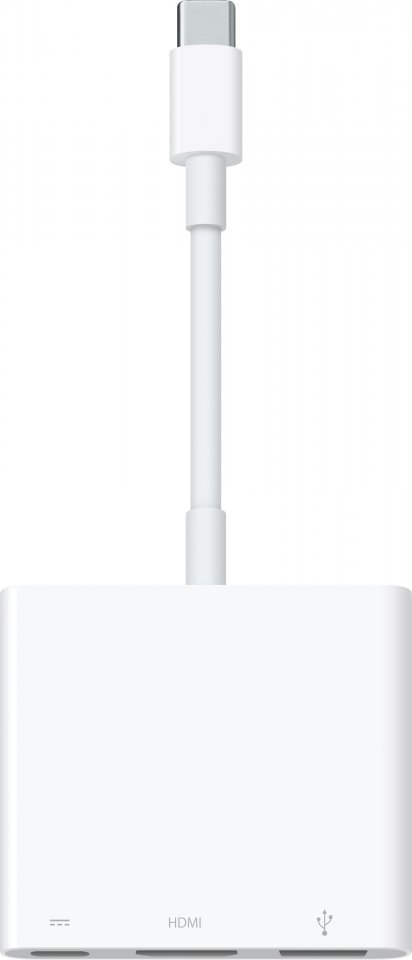
The USB-C Digital AV Multiport Adapter lets you connect an HDMI display to your USB-C–enabled Mac or iPad Pro while also connecting a standard USB device and a USB-C charging cable.
This adapter allows you to mirror your Mac’s display to an HDMI-compatible TV or display.
At 3840 x 2160 resolution and 60 Hz refresh rate on the following: 11-inch iPad Pro, 12.9-inch iPad Pro (3rd generation), MacBook Pro (15-inch model, 2017 and later), iMac (Retina 5K, 27-inch model, 2017 and later), iMac (Retina 4K, 21.5-inch model, 2017 and later), and iMac Pro (2018)
At 1080p resolution and 60 Hz refresh rate or UHD resolution (3840 x 2160) at 30 Hz on the following: MacBook Pro (13-inch model, 2016 and later), MacBook Pro (15-inch model, 2016), iMac (non-Retina, 21.5-inch model, 2017), and Mac mini (2018)
Simply connect the adapter to the USB-C or Thunderbolt 3 (USB-C) port on your Mac or iPad Pro, then connect to a TV or projector with an HDMI cable.
Use the standard USB port to connect devices such as a flash drive or camera, or to sync and charge iOS devices with a USB cable. You can also connect a charging cable to the USB-C port to charge your Mac or iPad Pro.
41 in stock

The USB-C Digital AV Multiport Adapter lets you connect an HDMI display to your USB-C–enabled Mac or iPad Pro while also connecting a standard USB device and a USB-C charging cable.
This adapter allows you to mirror your Mac’s display to an HDMI-compatible TV or display.
At 3840 x 2160 resolution and 60 Hz refresh rate on the following: 11-inch iPad Pro, 12.9-inch iPad Pro (3rd generation), MacBook Pro (15-inch model, 2017 and later), iMac (Retina 5K, 27-inch model, 2017 and later), iMac (Retina 4K, 21.5-inch model, 2017 and later), and iMac Pro (2018)
At 1080p resolution and 60 Hz refresh rate or UHD resolution (3840 x 2160) at 30 Hz on the following: MacBook Pro (13-inch model, 2016 and later), MacBook Pro (15-inch model, 2016), iMac (non-Retina, 21.5-inch model, 2017), and Mac mini (2018)
Simply connect the adapter to the USB-C or Thunderbolt 3 (USB-C) port on your Mac or iPad Pro, then connect to a TV or projector with an HDMI cable.
Use the standard USB port to connect devices such as a flash drive or camera, or to sync and charge iOS devices with a USB cable. You can also connect a charging cable to the USB-C port to charge your Mac or iPad Pro.