| Country of Origin | United States |
|---|---|
| PID | 954005 |
| Manufacturer address | One Microsoft Place, South County Business Park, Dublin D18 P521 IRELAND |
| Manufacturer's email address | |
| Manufacturer name | Microsoft Ireland Operations Limited |
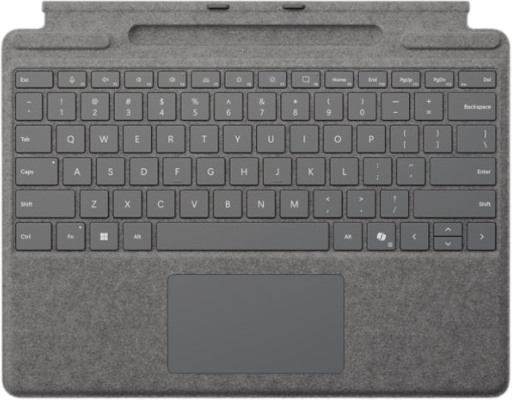
Enjoy comfortable typing with the Surface Pro keyboard – the perfect companion for your Surface device. The stylish and compact keyboard features a built-in pen storage compartment, a large glass touchpad for precise navigation, and a backlit mechanical keyboard for smooth typing. Quickly open Copilot with a dedicated shortcut key to boost your productivity and simplify your daily tasks.
Capture ideas instantly
Hold brainstorming sessions and sketch with others in Microsoft Teams or Microsoft Whiteboard. You can also edit presentations on the spot, fill out and sign documents, or take handwritten notes in Microsoft Journal.
Designed for accessible usability
Thanks to haptic feedback, you know when natural gestures have succeeded. Such gestures include selecting by circling and deleting by crossing out in Microsoft Word and Excel. The haptic feedback strength of the Surface Slim Pen 2 can be easily adjusted or even disabled in Windows settings.
Unleash your creativity in the apps you use
Create the best possible work in Adobe Fresco, Photoshop, and many others, collaborate and take handwritten notes together in Microsoft Teams. Capture unstructured ideas with Microsoft’s sketchpad and use handwriting simultaneously with others. Use Microsoft Word’s handwriting editor or the top button as a clicker to switch slides in Microsoft PowerPoint presentations.
Surface Pro keyboard technical specifications:
2 in stock

Enjoy comfortable typing with the Surface Pro keyboard – the perfect companion for your Surface device. The stylish and compact keyboard features a built-in pen storage compartment, a large glass touchpad for precise navigation, and a backlit mechanical keyboard for smooth typing. Quickly open Copilot with a dedicated shortcut key to boost your productivity and simplify your daily tasks.
Capture ideas instantly
Hold brainstorming sessions and sketch with others in Microsoft Teams or Microsoft Whiteboard. You can also edit presentations on the spot, fill out and sign documents, or take handwritten notes in Microsoft Journal.
Designed for accessible usability
Thanks to haptic feedback, you know when natural gestures have succeeded. Such gestures include selecting by circling and deleting by crossing out in Microsoft Word and Excel. The haptic feedback strength of the Surface Slim Pen 2 can be easily adjusted or even disabled in Windows settings.
Unleash your creativity in the apps you use
Create the best possible work in Adobe Fresco, Photoshop, and many others, collaborate and take handwritten notes together in Microsoft Teams. Capture unstructured ideas with Microsoft’s sketchpad and use handwriting simultaneously with others. Use Microsoft Word’s handwriting editor or the top button as a clicker to switch slides in Microsoft PowerPoint presentations.
Surface Pro keyboard technical specifications:
<!--[if gte mso 10]>/* Style Definitions */
table.MsoNormalTable
{mso-style-name:"Table Normal";
mso-tstyle-rowband-size:0;
mso-tstyle-colband-size:0;
mso-style-noshow:yes;
mso-style-priority:99;
mso-style-parent:"";
mso-padding-alt:0cm 5.4pt 0cm 5.4pt;
mso-para-margin:0cm;
mso-pagination:widow-orphan;
font-size:10.0pt;
font-family:"Times New Roman",serif;} <![endif]-->